# Pagination Best Practices for Google | Google Search Central
# Pagination, incremental page loading, and their impact on Google Search
You can improve the experience of users on your site by displaying a subset of results to
improve page performance, but you may need to take action to ensure the Google
crawler can find all your site content.
For example, you may display a subset of available products in response to a user using the
search box on your ecommerce site---the full set of matches may be too large to display on a
single web page, or take too long to retrieve.
Beyond search results, you may load partial results on your ecommerce site for:
- Category pages where all products in a category are displayed
- Blog posts or newsletter titles that a site has published over time
- User reviews on a product page
- Comments on a blog post
Having your site incrementally load content, in response to user actions, can benefit your users by:
- Improving user experience as the initial page load is faster than loading all results at once.
- Reducing network traffic, which is particularly important for mobile devices.
- Improving backend performance by reducing the volume of content retrieved from databases or similar.
- Improving reliability by avoiding excessively long lists that may hit resource limits leading to errors in the browser and backend systems.
## Selecting the best UX pattern for your site
To display a subset of a larger list, you can choose between different UX patterns:
- **Pagination**: Where a user can use links such as "next", "previous", and page numbers to navigate between pages that display one page of results at a time.
- **Load more**: Buttons that a user can click to extend an initial set of displayed results.
- **Infinite scroll** : Where a user can scroll to the end of the page to cause more content to be loaded. (Learn more about [infinite scroll search-friendly recommendations](https://developers.google.com/search/docs/crawling-indexing/javascript/lazy-loading#paginated-infinite-scroll).)
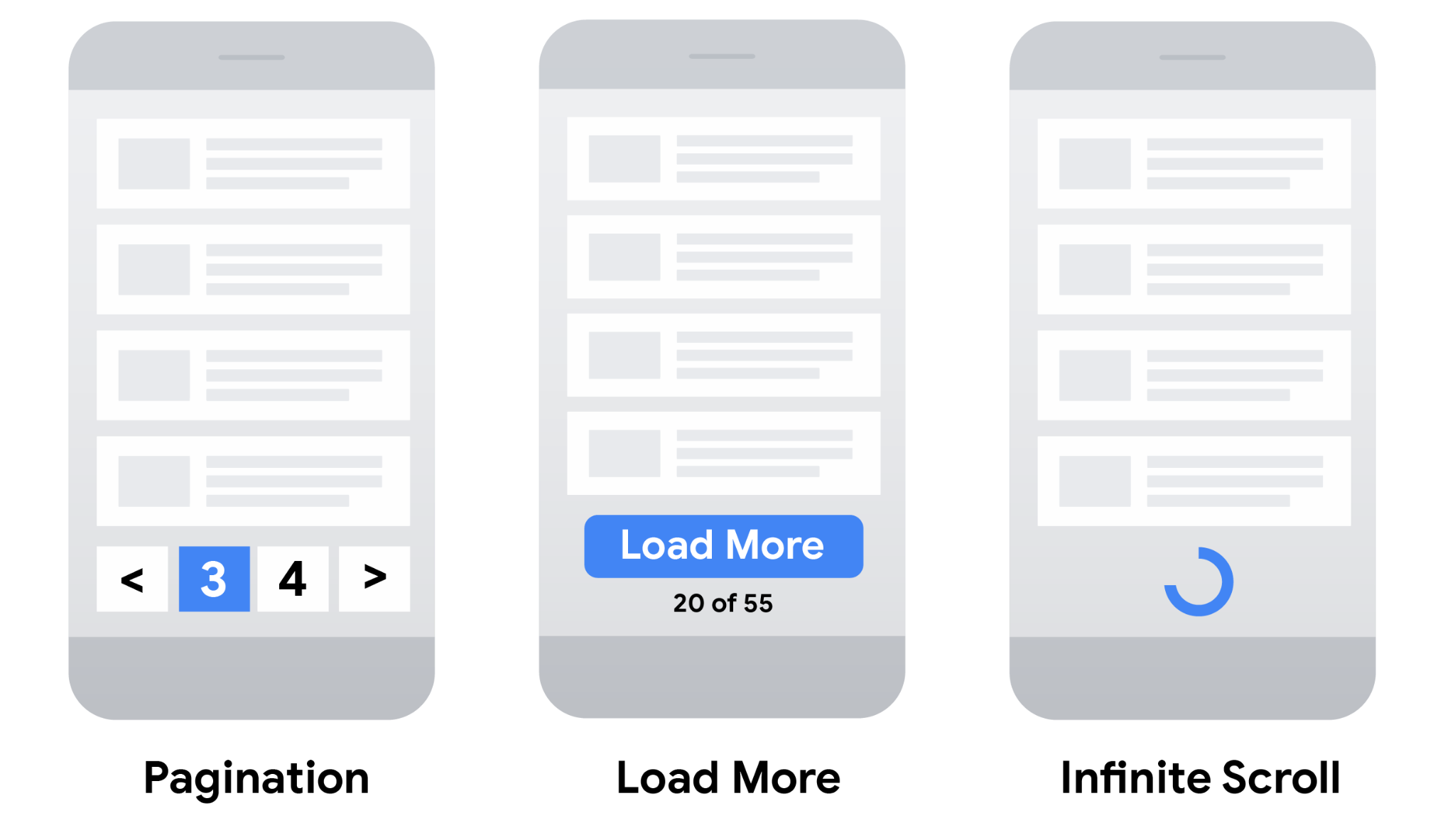
Consider the following table when choosing the most suitable user experience for your site.
| UX Pattern ||
|---|---|
| Pagination | |---|---| | **Pros:** - Gives users insight into result size and current position | **Cons:** - More complex controls for users to navigate through results - Content is split across multiple pages rather than being a single continuous list - Viewing more requires new page loads | |
| Load more | |---|---| | **Pros:** - Uses a single page for all content - Can inform user of total result size (on or near the button) | **Cons:** - Can't handle very large numbers of results as all of the results are included on a single web page | |
| Infinite scroll | |---|---| | **Pros:** - Uses a single page for all content - Intuitive -- the user just keeps scrolling to view more content | **Cons:** - Can lead to "scrolling fatigue" because of unclear result size - Can't handle very large numbers of results | |
## How Google indexes the different strategies
Once you've selected the most appropriate UX strategy for your site and SEO, make sure the Google
crawler can find all of your content.
For example, you can implement pagination using links to new pages on your ecommerce site, or
using JavaScript to update the current page. "Load more" functionalities and infinite scroll
are generally implemented using JavaScript. When crawling a site to find pages to index,
Google generally crawls URLs found in the `href` attribute of
`` elements. Google's crawlers don't "click" buttons and generally don't
trigger JavaScript functions that require user actions to update the current page contents.
If your site uses JavaScript, follow these
[JavaScript SEO best practices](https://developers.google.com/search/docs/crawling-indexing/javascript/javascript-seo-basics).
In addition to best practices, such as making sure links on your site are crawlable, consider using a
[sitemap](https://developers.google.com/search/docs/crawling-indexing/sitemaps/build-sitemap)
file or a
[Google Merchant Center feed](https://support.google.com/merchants/answer/7439058)
to help Google find all of the products on your site.
## Best practices when implementing pagination
To make sure Google can crawl and index your paginated content, follow these best practices:
- [Link pages sequentially](https://developers.google.com/search/docs/specialty/ecommerce/pagination-and-incremental-page-loading#sequentially)
- [Use URLs correctly](https://developers.google.com/search/docs/specialty/ecommerce/pagination-and-incremental-page-loading#use-urls-correctly)
- [Avoid indexing URLs with filters or alternative sort orders](https://developers.google.com/search/docs/specialty/ecommerce/pagination-and-incremental-page-loading#avoid-indexing-variations)
### Link pages sequentially
To make sure search engines understand the relationship between pages of paginated content,
include links from each page to the following page using `` tags. This
can help Googlebot (the Google web crawler) find subsequent pages.

In addition, consider linking from all individual pages in a collection back to the first page
of the collection to emphasize the start of the collection to Google. This can give Google a
hint that the first page of a collection might be a better landing page than other pages in
the collection.
> [!NOTE]
> Normally, we recommend that you give web pages distinct titles to help differentiate them. However, pages in a paginated sequence don't need to follow this recommendation. You can use the same titles and descriptions for all pages in the sequence. Google tries to recognize pages in a sequence and index them accordingly.
### Use URLs correctly
- **Give each page a unique URL** . For example, include a `?page=n` query parameter, as URLs in a paginated sequence are treated as separate pages by Google.
- **Don't use the first page of a paginated sequence as the canonical page** . Instead, give each page its own [canonical URL](https://developers.google.com/search/docs/crawling-indexing/consolidate-duplicate-urls).
- **Don't use URL fragment identifiers (the text after a `#` in a URL) for page numbers in a collection** . Google ignores fragment identifiers. If Googlebot sees a URL to the next page that only differs by the text after the `#`, it may not follow the link, thinking it has already retrieved the page.
- **Consider using
[preload, preconnect, or prefetch](https://web.dev/learn/performance/resource-hints)** to optimize the performance for a user moving to the next page.
> [!NOTE]
> In the past, Google used `` and `` to identify next page and previous page relationships. Google no longer uses these tags, although these links may still be used by other search engines.
### Avoid indexing URLs with filters or alternative sort orders
You may choose to support filters or different sort orders for long lists of results on your
site. For example, you may support `?order=price` on URLs to return the same
list of results ordered by price.
To avoid indexing variations of the same list of results, block unwanted URLs from being indexed with the
[`noindex` robots `meta` tag](https://developers.google.com/search/docs/crawling-indexing/block-indexing)
or discourage crawling of particular
[URL patterns with a robots.txt file](https://developers.google.com/search/docs/crawling-indexing/robots/robots_txt#url-matching-based-on-path-values).